6. 字符串新特性
- 6.1. 概述
- 6.2. Unicode 代码点转义
- 6.3. 字符串插值、多行字符串字面量和原始字符串字面量
- 6.4. 迭代字符串
- 6.4.1. 迭代遵循 Unicode 代码点
- 6.4.2. 统计代码点数量
- 6.4.3. 反转包含非 BMP 代码点的字符串
- 6.5. 代码点的数值
- 6.6. 检查是否包含
- 6.7. 重复字符串
- 6.8. 将正则表达式工作委托给其参数的字符串方法
- 6.9. 参考:新的字符串方法
6.1 概述
新的字符串方法
ES6 有一种新的字符串字面量,称为模板字面量
// String interpolation via template literals (in backticks)
const first = 'Jane';
const last = 'Doe';
console.log(`Hello ${first} ${last}!`);
    // Hello Jane Doe!

// Template literals also let you create strings with multiple lines
const multiLine = `
This is
a string
with multiple
lines`;
6.2 Unicode 代码点转义
在 ECMAScript 6 中,有一种新的 Unicode 转义方式,允许您指定任何代码点(即使是超过 16 位的代码点)
console.log('\u{1F680}');    // ES6: single code point
console.log('\uD83D\uDE80'); // ES5: two code units
有关转义的更多信息,请参阅Unicode 章节。
6.3 字符串插值、多行字符串字面量和原始字符串字面量
模板字面量在其章节中有详细描述。它们提供了三个有趣的功能。
首先,模板字面量支持字符串插值
const first = 'Jane';
const last = 'Doe';
console.log(`Hello ${first} ${last}!`);
    // Hello Jane Doe!
其次,模板字面量可以包含多行
const multiLine = `
This is
a string
with multiple
lines`;
第三,如果在模板字面量前面加上标签 String.raw,则它们是“原始的”——反斜杠不是特殊字符,并且不会解释 \n 等转义字符
const str = String.raw`Not a newline: \n`;
console.log(str === 'Not a newline: \\n'); // true
6.4 迭代字符串
字符串是可迭代的,这意味着您可以使用 for-of 迭代它们的字符
for (const ch of 'abc') {
    console.log(ch);
}
// Output:
// a
// b
// c
您可以使用展开运算符 (...) 将字符串转换为数组
const chars = [...'abc'];
    // ['a', 'b', 'c']
6.4.1 迭代遵循 Unicode 代码点
字符串迭代器沿着代码点边界分割字符串,这意味着它返回的字符串包含一个或两个 JavaScript 字符
for (const ch of 'x\uD83D\uDE80y') {
    console.log(ch.length);
}
// Output:
// 1
// 2
// 1
6.4.2 统计代码点数量
迭代为您提供了一种快速统计字符串中 Unicode 代码点数量的方法
6.4.3 反转包含非 BMP 代码点的字符串
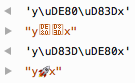
迭代还有助于反转包含非 BMP 代码点(大于 16 位并编码为两个 JavaScript 字符)的字符串
const str = 'x\uD83D\uDE80y';

// ES5: \uD83D\uDE80 are (incorrectly) reversed
console.log(str.split('').reverse().join(''));
    // 'y\uDE80\uD83Dx'

// ES6: order of \uD83D\uDE80 is preserved
console.log([...str].reverse().join(''));
    // 'y\uD83D\uDE80x'
6.5 代码点的数值
新方法 codePointAt() 返回字符串中给定索引处代码点的数值
const str = 'x\uD83D\uDE80y';
console.log(str.codePointAt(0).toString(16)); // 78
console.log(str.codePointAt(1).toString(16)); // 1f680
console.log(str.codePointAt(3).toString(16)); // 79
当与字符串迭代结合使用时,此方法效果很好
for (const ch of 'x\uD83D\uDE80y') {
    console.log(ch.codePointAt(0).toString(16));
}
// Output:
// 78
// 1f680
// 79
codePointAt() 的反义词是 String.fromCodePoint()
6.6 检查是否包含
三种新方法检查一个字符串是否存在于另一个字符串中
这些方法中的每一个方法都有一个可选的第二个参数,用于指定要搜索的字符串的开始或结束位置
6.7 重复字符串
repeat() 方法重复字符串
6.8 将正则表达式工作委托给其参数的字符串方法
在 ES6 中,接受正则表达式参数的四种字符串方法做的事情相对较少。它们主要调用其参数的方法
-
String.prototype.match(regexp)调用
regexp[Symbol.match](this). -
String.prototype.replace(searchValue, replaceValue)调用
searchValue[Symbol.replace](this, replaceValue). -
String.prototype.search(regexp)调用
regexp[Symbol.search](this). -
String.prototype.split(separator, limit)调用
separator[Symbol.split](this, limit).
参数不再必须是正则表达式。任何具有适当方法的对象都可以。
6.9 参考:新的字符串方法
标记模板
-
String.raw(callSite, ...substitutions) : string
用于“原始”内容的模板标签(不解释反斜杠)> String.raw`\n` === '\\n' true有关更多信息,请参阅模板字面量章节。
Unicode 和代码点
-
String.fromCodePoint(...codePoints : number[]) : string
将表示 Unicode 代码点的数字转换为字符串。 -
String.prototype.codePointAt(pos) : number
返回从位置pos开始的代码点的编号(包含一个或两个 JavaScript 字符)。 -
String.prototype.normalize(form? : string) : string
代码点的不同组合可能看起来相同。Unicode 规范化将它们全部更改为相同的值,即所谓的规范表示。这有助于比较和搜索字符串。建议对一般文本使用'NFC'形式。
查找字符串
-
String.prototype.startsWith(searchString, position=0) : boolean
接收器是否以searchString开头?position允许您指定要检查的字符串的开始位置。 -
String.prototype.endsWith(searchString, endPosition=searchString.length) : boolean
接收器是否以searchString结尾?endPosition允许您指定要检查的字符串的结束位置。 -
String.prototype.includes(searchString, position=0) : boolean
接收器是否包含searchString?position允许您指定要搜索的字符串的开始位置。
重复字符串
-
String.prototype.repeat(count) : string
返回接收器,连接count次。